How to Resolve E-Shikshakosh Location Detection Issues 2025
How to Resolve E-Shikshakosh Location Detection Issues 2025
Teachers in Bihar have reported challenges with the E-Shikshakosh app’s location detection feature, which is crucial for marking attendance. The app requires teachers to be within 500 meters of their school to register attendance, but many have experienced inaccuracies, such as being marked several kilometers away even when present on campus.
This article will help you understand the issue and guide you on how to resolve location detection problems quickly.
Understanding the Problem with Location Detection
The E-Shikshakosh app uses GPS to verify a teacher’s location. However, due to various factors like weak network signals, outdated app versions, or GPS inaccuracies, the app may not always detect the correct location. This can lead to attendance discrepancies, causing frustration among teachers.
You can also read:How to Update Teacher Training Records on E-Shikshakosh 2025
Step-by-Step Guide to Resolve Location Detection Issues
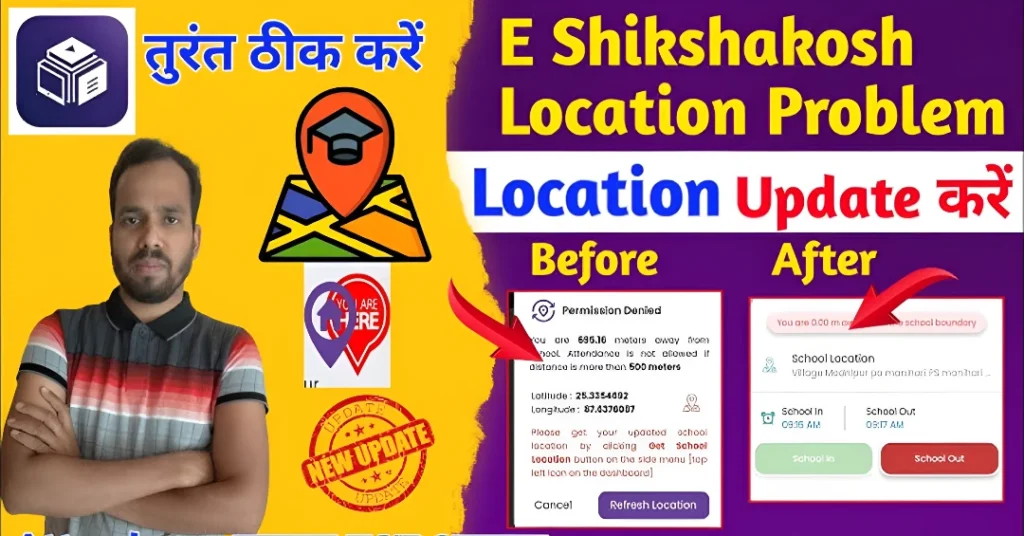
Go to your device’s settings and confirm that both GPS and location services are turned on.
Set the location mode to “High accuracy” to improve GPS performance.
Visit the Google Play Store and check for any available updates for the E-Shikshakosh app.
Updating to the latest version can fix bugs and improve functionality.
Navigate to your device’s settings, find the E-Shikshakosh app under “Apps,” and select “Storage.”
Tap on “Clear Cache” and “Clear Data” to remove any corrupted files that may be affecting the app’s performance.
Sometimes, simply restarting your device can resolve temporary glitches affecting GPS and app performance.
A weak or unstable internet connection can hinder the app’s ability to detect your location accurately.
Try connecting to a different Wi-Fi network or use mobile data with a stronger signal.
If the issue persists, reach out to the E-Shikshakosh helpdesk at helpdesk.esks@gmail.com for further assistance.
Additional Tips for Improving Location Accuracy
Check Location Before Marking Attendance: Before attempting to mark your attendance, ensure that your device’s location is accurate and stable.
Avoid Using the App in Moving Vehicles: GPS signals can be unreliable when you’re in motion, leading to incorrect location readings.
Use the App During Peak Signal Times: Try using the app during times when network traffic is low, such as early mornings, to ensure better connectivity.
How to Optimize Your Device for Accurate GPS Tracking
To enhance the location detection process, follow these extra steps:
Sometimes, turning on Wi-Fi and Bluetooth can help your device get a more accurate location fix, even when GPS is weak.
Regular updates improve the device’s performance, including its GPS accuracy.
Open Google Maps to check if your location is accurate before using the E-Shikshakosh app. This can help you verify if the problem is with the app or your device’s GPS.
Dealing with Persistent Location Issues: What To Do Next
If you’ve tried all the steps and still face issues, here’s what you can do:
Try a Different Device: If possible, try using another device to access the app. Sometimes, the issue could be specific to your phone.
Reset Device Settings: As a last resort, you can reset your device’s settings to their default state. Just make sure to back up any important data before doing so.
FAQs
Final Words
While the E-Shikshakosh app aims to streamline attendance tracking, technical issues can sometimes hinder its effectiveness. By following the steps above and ensuring your device’s settings are optimized, you can improve the app’s performance and accurately mark your attendance. If problems persist, don’t hesitate to seek assistance from the helpdesk. Keep your app updated, and you’ll have a smoother experience using E-Shikshakosh. Happy teaching!