Why Your School’s Location Isn’t Showing in E-Shikshakosh
Why Your School’s Location Isn’t Showing in E-Shikshakosh
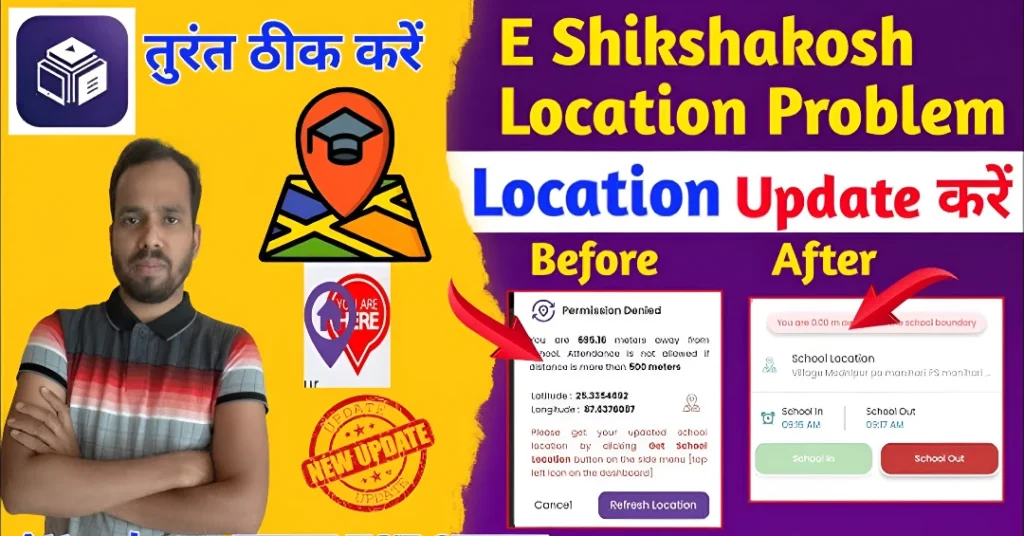
If your school’s location isn’t appearing correctly on the E-Shikshakosh portal, you’re not alone. Many teachers and school administrators in Bihar have reported similar issues. This problem can affect attendance marking, school data accuracy, and the overall functionality of the portal. Understanding the root causes and knowing how to address them can help ensure your school’s location is correctly displayed.
Common Reasons for Location Display Issues
Incomplete or Incorrect School Profile If your school’s profile lacks accurate latitude and longitude coordinates, the system may fail to pinpoint its location. This often occurs when the profile hasn’t been updated or verified.
GPS Signal Interference The E-Shikshakosh app relies on GPS to determine your location. Weak or fluctuating GPS signals can lead to incorrect location readings, even if you’re within the school premises.
Outdated App Versions Using an outdated version of the E-Shikshakosh app can result in bugs and glitches, including issues with location detection.
Server or Technical Glitches Occasionally, server issues or technical glitches can cause temporary problems with location services on the portal.
You can also read:What to Do if E-Shikshakosh Attendance Fails to Submit 2025
Steps to Resolve Location Display Issues
Log in to the E-Shikshakosh portal as a school official.
Navigate to the “School Profile” section.
Ensure that the latitude and longitude fields are correctly filled.
If unsure, use a GPS tool or Google Maps to obtain accurate coordinates.
Save the changes and log out.
On your device, go to “Settings” > “Location.”
Ensure that location services are turned on.
Set the location mode to “High accuracy.”
Open the E-Shikshakosh app and check if the location displays correctly.
Visit the Google Play Store or the App Store.
Search for “E-Shikshakosh.”
If an update is available, tap “Update.”
After updating, reopen the app and check the location.
If the issue persists, contact the E-Shikshakosh helpdesk at helpdesk.esks@gmail.com or call 9523300520 for further assistance.
Ensure Your Device’s GPS is Accurate
Sometimes, the issue is not with the app but with your device’s GPS settings. To resolve this:
Set your GPS to “High accuracy” in your device settings for better location accuracy.
Use Google Maps to verify if your location is detected accurately before using the E-Shikshakosh app.
Ensure that there are no obstructions like tall buildings or underground areas that may affect GPS signal strength
Verify Your School’s Coordinates Using Google Maps
If you’re unsure about your school’s latitude and longitude, use Google Maps to find accurate coordinates:
Check for Server Maintenance or Technical Issues
Occasionally, E-Shikshakosh may undergo server maintenance, which can temporarily disrupt location services. To check if this is the cause:
Visit the official website or check any official communication for information on server maintenance.
If you suspect server issues, wait for a while and try again later.
FAQs
Final Words
Ensuring your school’s location is correctly displayed on the E-Shikshakosh portal is vital for smooth operations, such as attendance marking and record management. By following the steps outlined above, you can resolve most location-related issues. If you encounter persistent problems, don’t hesitate to reach out to technical support for help. Stay proactive with your school’s profile updates, and you’ll have no trouble managing your educational records efficiently.